
For agencies & freelancers
Add AI support to every client store. Earn 25% for life.
For Shopify Experts, Wix Partners, web and ecommerce agencies, and freelancers. Install SuperBot for your clients on the platforms they already use, and earn on every paying client you refer.
 PartnerStack
- To start: 200 conversations a month, no card
- $0To start: 200 conversations a month, no card
- Teammates and websites on every plan
- ∞Teammates and websites on every plan
- Recurring commission, for the customer's lifetime
- 25%Recurring commission, for the customer's lifetime
- Widget languages
- 35Widget languages
Why it's easy to sell
Nothing for the client to sign off.
A free plan, public prices, no seat maths, and an install path for the platform the client is already on.
A free plan to start
The client starts on the free plan: 200 conversations a month, no credit card. Nobody has to sign off a budget to try it.
No per-seat fees
Every plan includes unlimited teammates, so adding you, your team and the client's staff never changes the bill.
Unlimited websites
Every plan includes unlimited websites and knowledge sources. Paid plans are $25 a month (2,000 conversations) or $60 a month (unlimited); yearly saves 20%.
A demo that runs on their store
Paste the client's address into the live demo and it answers from their own pages in about a minute. Free, no sign-up.
It doesn't guess
Answers come from the client's pages, documents and approved Q&A. When the answer isn't there, it says so and hands the chat to a person.
Their badge, their call
The free plan shows a “Powered by SuperBot” badge. On Starter and Pro the client can customise or remove it.
Installs where clients already are
Apps on the Shopify App Store and Wix App Market, a WordPress.org plugin, Squarespace and Square connections, or one script tag anywhere else.
 Shopify
 Wix
Wix WordPress
 WooCommerce
 Squarespace
 Square
How you earn
25% of every payment, for as long as the client stays.
The SuperBot affiliate program runs on PartnerStack. Clients who sign up through your link are credited to you, and you earn on every payment they make.
- Starter client$6.25 /month
25% of $25 a month, every month they pay.
- Pro client$15 /month
25% of $60 a month, every month they pay.
- Lifetime of the account: there is no cut-off month.
- 90-day tracking window from the click on your link.
- Totalled at month end and paid the month after, through PartnerStack.
- Arithmetic on current prices, not guaranteed earnings. Program terms apply.
Applications on PartnerStackApply to the partner program.
Apply with your agency's details in PartnerStack. Applications are reviewed by a person; approval is not guaranteed.
Free to apply. Full program details are on the affiliate program page.
Run it for clients
Each client gets their own workspace. You get invited in.
Separate workspaces keep each client's conversations, training, plan and billing apart. You work inside them with the role the client gives you.
One workspace per client
The client creates their own SuperBot account, ideally through your referral link, so the plan and billing are theirs. Installing a store app on a store with no account also creates a workspace for it.
They invite you as Admin
From Team in the dashboard, the client invites you by email. Accept while signed in with that exact address.
Install and train
Install on their platform, add their policies and pages to Knowledge, and teach exact answers to their top questions in Training.
Hand over the inbox
Invite the client's staff so handoffs reach a person, connect Slack, a CRM or email, and review the first week of chats together.
- Admin
Manages the team, settings and training. The role for you or your agency.
- Agent
Answers the chats SuperBot hands off. The usual role for the client's staff.
- Viewer
Read-only access to chats and analytics. Useful for a client's manager.
What there isn't (yet): a multi-client agency dashboard.
One SuperBot login works in one workspace at a time. If you look after several clients, use a separate login (email address) for each client's workspace.
Installing a store app for a client who already has an account? Generate a one-time pairing code in Store connections and paste it into the app, so the store joins their workspace. Step-by-step help is in the install checklists and the install guides.
Partner kit
Everything you need for the client call.
Free to download. No application needed. Swap in your agency's name and send.
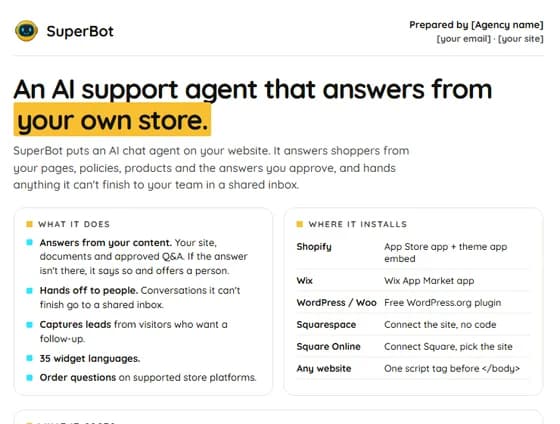
- PDF · 1 pageClient pitch one-pager
What SuperBot does, where it installs, what it costs, and a link to the live demo. Add your agency's name and send it.
 Download
 - HTML · editableOne-pager you can edit
The same page in your browser. Click the “Prepared by” line to add your details, then print or save as PDF.
Open - Markdown · 3 emailsClient email templates
A quick idea for an existing client, a proposal add-on for a new site, and a follow-up after the demo.
Download - Markdown · 60 secondsDemo talk track
What to say while the live demo reads the client's store, which questions to ask, and how to close.
Download - Markdown · 6 platformsInstall checklists
Shopify, Wix, WordPress and WooCommerce, Squarespace, Square Online and any other site, plus the after-install steps.
Download
Want a client to see it first? Send them to the live demo with their own store's address.
FAQ
Agency questions.
Something else? Talk to a human. A real person reads every message.
Is there an agency dashboard for managing several clients?
Not yet. Each client has their own SuperBot workspace, and you work in it as a teammate the client invites. One SuperBot login works in one workspace at a time, so if you look after several clients, use a separate login (email address) for each client's workspace.
Who pays for the client's plan?
We recommend the client does: they create the account, choose the plan and hold the billing, and you work in it as an Admin. Many clients never need to leave the free plan (200 conversations a month). Starter is $25 a month for 2,000 conversations and Pro is $60 a month with no limit; yearly billing saves 20%.
How much do I earn?
25% of every payment a referred customer makes, for the lifetime of the account: $6.25 a month for a Starter client and $15 a month for a Pro client. Referrals are tracked by PartnerStack with a 90-day window, and commissions are paid the month after they are earned. Program terms apply and approval is not guaranteed.
Do I have to be an affiliate to install SuperBot for clients?
No. You can set SuperBot up for clients without joining the program. Joining is free and is how you earn the 25% recurring commission on clients who sign up through your link.
Which platforms can I install it on?
There's an app on the Shopify App Store and the Wix App Market, a free plugin on WordPress.org that also covers WooCommerce, and connections for Squarespace and Square Online. Any other website, including Webflow and custom builds, takes one script tag.
Can I charge clients for setup?
Yes. How you price setup, training and ongoing management is between you and your client. SuperBot bills the client's plan directly.
What happens if the client already installed the store app?
A store with no SuperBot account gets its own workspace when the app is installed, and you can be invited to it. If the client already has an account, generate a one-time pairing code in Store connections and paste it into the app, so the store joins that workspace instead of starting a new one.
Put SuperBot on your next client store. Earn on it.
Apply to the partner program for free, or show a client the live demo on their own store today.